
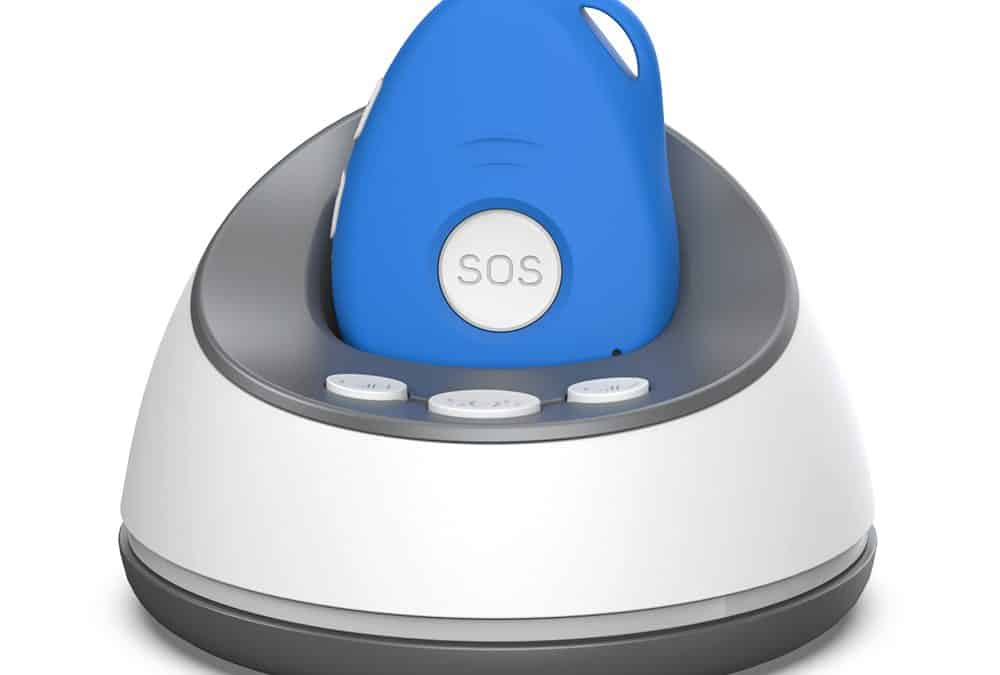
This guide explains how fall detection works, its limitations, what medical alarms cost in New Zealand and how Familyr's family-monitored model compares with professionally monitored services.
Fall Detection Medical Alarms in New Zealand: 15 Questions Answered
A fall detection medical alarm is a wearable safety device that can send an alert when it detects the movement pattern of a possible fall. Most devices also have a manual SOS button. Depending on the service, an alert may go to a professional monitoring centre or directly to nominated family members, friends or carers.
Falls are a significant issue in Aotearoa New Zealand. ACC says falls make up 39% of all claims, and nearly one-quarter of New Zealanders aged 65 and over have a fall-related ACC claim each year. A medical alarm cannot prevent a fall, but it can provide another way to request help when reaching a phone is difficult.
Questions answered in this guide
- 1. What is a fall detection medical alarm?
- 2. How does automatic fall detection work?
- 3. Will a fall detection alarm detect every fall?
- 4. What happens when Familyr detects a possible fall?
- 5. What happens when the Familyr SOS button is pressed?
- 6. What is the difference between a family-monitored and professionally monitored medical alarm?
- 7. What features matter most in a medical alarm with fall detection?
- 8. What is the difference between an in-home and an anywhere medical alarm?
- 9. Does a fall detection medical alarm need mobile coverage?
- 10. Can Familyr be worn in the shower or rain?
- 11. Is a fall detection alarm suitable for seniors or people living with dementia?
- 12. Do no-monthly-fee medical alarms still have ongoing costs?
- 13. How much do fall detection medical alarms cost in New Zealand?
- 14. Can a Familyr medical alarm call 111 directly?
- 15. Can I get funding for a medical alarm in New Zealand?
1. What is a fall detection medical alarm?
A fall detection medical alarm is usually a pendant, wrist-worn device or other wearable containing sensors that look for rapid movement, a change in angle and impact consistent with a fall. When the device identifies a possible fall, it starts a pre-programmed alert sequence.
Automatic fall detection is a backup feature. If the wearer is conscious and able to do so, pressing the manual SOS button remains the clearest way to request help.
2. How does automatic fall detection work?
The device analyses movement rather than understanding the event in the way a person would. Different products use different combinations of movement, angle, impact and position data.
A typical sequence is:
- The device detects movement that may indicate a fall.
- It vibrates or plays an audible warning.
- The wearer has a short opportunity to cancel a false alarm.
- If the alert is not cancelled, the device contacts its monitoring centre or nominated responders.
- A responder assesses the situation and arranges appropriate help.
The exact process varies by device and provider, so buyers should ask for a demonstration before relying on an alarm.
3. Will a fall detection alarm detect every fall?
No. Automatic fall detection cannot identify every fall, and it can sometimes mistake an abrupt everyday movement for a fall.
Slow collapses, sliding down a wall, bracing against furniture or a device being worn loosely or inside clothing may affect detection. A sudden movement may also cause a false alert. Buyers should look for adjustable sensitivity, a cancellation period and a manual SOS button.
Fall detection should not be described as guaranteed protection or as a replacement for calling 111 in an emergency.
4. What happens when Familyr detects a possible fall?
Familyr assesses altitude, angle and impact to identify a possible serious fall. When its fall alert activates, the device vibrates and announces that a fall has been detected. The announcement repeats three times so the wearer can cancel a false alarm.[2]
If the alert is not cancelled, Familyr sends fall-alert text messages to the nominated mobile contacts and begins calling the contacts in the programmed order. The sensitivity can be adjusted, or fall detection can be switched off, using text-message commands.
If the wearer is conscious and able, Familyr recommends pressing and holding the SOS button until the device vibrates rather than relying only on automatic detection.
5. What happens when the Familyr SOS button is pressed?
The wearer presses and holds the SOS button for three seconds. Familyr then provides audible cancellation prompts before starting its emergency sequence.
If the alert continues:
- Familyr sends an emergency SMS to nominated mobile contacts.
- The message includes a Google Maps link showing the device's available location.
- The device calls contacts one at a time in the selected order.
- The built-in speaker and microphone allow a hands-free conversation.
- The responder can contact a nearby support person or call 111 if emergency services are required.
Up to 10 contact numbers can be programmed. Landlines can receive calls but cannot receive the SMS location link.
6. What is the difference between a family-monitored and professionally monitored medical alarm?
A family-monitored alarm sends alerts directly to people chosen by the wearer. A professionally monitored alarm connects to a monitoring service, where staff assess the alert and follow the provider's response procedure.
| Decision point | Family-monitored alarm | Professionally monitored alarm |
|---|---|---|
| First responder | Family, friends, neighbours or carers | Monitoring-service staff |
| Ongoing monitoring charge | May have no monitoring fee | Normally includes an ongoing rental or monitoring charge |
| Personal knowledge | Responders may know the wearer's history, routines and location | The service follows the information and procedure held on file |
| Main dependency | Nominated contacts must be available and willing to respond | The monitoring service and its systems must be available |
| Potential funding | A one-off purchase is generally not covered by Work and Income | Eligible rental and monitoring costs may qualify through Disability Allowance |
Neither model is automatically best. A family-monitored alarm can suit someone with a dependable response network. A professionally monitored service may be more appropriate when reliable personal responders are not available or a formal monitoring service is preferred.
7. What features matter most in a medical alarm with fall detection?
Prioritise features that affect real-world use:
- A manual SOS button that is easy to find and operate
- Automatic fall detection with a false-alarm cancellation period
- Clear two-way voice communication
- GPS or another useful location method for an anywhere alarm
- Mobile-network compatibility and coverage where the wearer lives and travels
- Multiple emergency contacts and a documented response order
- Manageable charging and clear low-battery alerts
- Water resistance appropriate for shower use
- Comfortable wearing options that encourage consistent use
- Transparent purchase, rental, monitoring and SIM costs
- A clear testing routine, warranty and local support
For a person living with dementia or at risk of wandering, location requests, geofence alerts, no-motion alerts and an agreed caregiver response plan may also be relevant. Technology does not replace individual assessment, supervision or clinical advice.
8. What is the difference between an in-home and an anywhere medical alarm?
Work and Income distinguishes between:
- In-home medical alarms, which operate inside the home and within the system's supported range.
- Anywhere medical alarms, which are designed to operate outside the home as well as inside.
Familyr is a mobile personal emergency response system, or mPERS. It is intended for use at home and while the wearer is out, provided compatible mobile coverage is available.
9. Does a fall detection medical alarm need mobile coverage?
A cellular medical alarm needs sufficient coverage to send texts, place calls and provide network-assisted location functions. Without usable network coverage, Familyr cannot transmit or receive.
Before buying an anywhere alarm, check coverage at the wearer's home and common destinations. Test the device indoors, outside the home and along usual walking or travel routes. GPS and other location methods can also be less precise inside buildings, around tall structures or in obstructed environments.
10. Can Familyr be worn in the shower or rain?
Familyr is water resistant and can be worn in the shower or rain. It must not be submerged in a bath, spa, swimming pool or the ocean.[2]
Do not assume that every medical alarm offers the same water protection. Check the supplier's published instructions and make sure the chosen wearing method is suitable for shower use.
11. Is a fall detection alarm suitable for seniors or people living with dementia?
A fall alarm may help an older person, someone living alone or a person with mobility, balance or health concerns request assistance when they cannot reach a phone. Suitability depends on the person's needs, ability to wear and charge the device, mobile coverage and available responders.
For someone living with dementia, fall detection alone may not address wandering or disorientation. Location, geofence and no-motion alerts may be useful, but the family should also consider consent, privacy, charging, who will respond and whether a professional assessment is needed.
Familyr may suit someone who has reliable family members, friends or carers willing to receive and act on alerts. A professionally monitored alarm may be more appropriate when that network is not available.
12. Do no-monthly-fee medical alarms still have ongoing costs?
Often, yes. "No monthly fee" usually means there is no subscription or professional-monitoring charge. A cellular device may still need an active SIM, sufficient prepaid credit or a mobile plan.
Familyr has no rental fee or ongoing professional-monitoring fee. The purchase includes an installed prepaid SIM with $50 credit, but the owner is responsible for future top-ups. Familyr states that operating cost varies with calls, texts and tracking use.
Ask every supplier to identify:
- The purchase or installation price
- Rental and monitoring charges
- SIM, call, text or data costs
- Fall-detection add-on charges
- Cancellation or exit fees
- Replacement and repair costs
13. How much do fall detection medical alarms cost in New Zealand?
Familyr is currently advertised at $550 plus GST, or $632.50 including GST, as a one-off purchase. It has no ongoing monitoring fee, although SIM usage continues.[3]
Work and Income publishes the following weekly prices for one alarm from MSD-accredited monitored-alarm suppliers:[4]
| Provider | In-home alarm | Anywhere alarm | Response model |
|---|---|---|---|
| ADT Security | $16.22 per week | $26.50 per week | Professionally monitored |
| VitalCall (Chubb New Zealand) | $19.14 per week | $27.65 per week | Professionally monitored |
| Freedom Medical Alarms | $16.39 per week | $28.99 per week | Professionally monitored |
| St John Medical Alarms | $17.27 per week | $25.57 per week | Professionally monitored |
| Familyr | $632.50 including GST, one-off | Same mobile device | Family monitored; SIM usage continues |
These are not like-for-like services. The accredited suppliers provide monitored services with ongoing charges. Familyr is a purchased device that alerts the wearer's nominated contacts. Compare who responds, service inclusions, coverage and funding eligibility as well as price.
Provider prices can change. The Work and Income table was updated on 17 June 2026 and was checked for this guide on 13 October 2026.
14. Can a Familyr medical alarm call 111 directly?
Yes. Familyr can be programmed with 111 as one of its emergency contact numbers. However, 111 cannot receive Familyr's help text or Google Maps location link.
Familyr recommends programming a trusted person as the first responder and, if 111 is included, placing it last in the calling sequence. A nominated contact can receive the location message, speak with the wearer and call emergency services with the available information.
Call 111 only when an emergency response is needed from Police, Fire or Ambulance.[5] Programming 111 into a device does not guarantee connection, location accuracy, dispatch or a particular outcome. In an immediate emergency, call 111 directly whenever possible.
15. Can I get funding for a medical alarm in New Zealand?
Work and Income may help an eligible person with ongoing medical-alarm rental and monitoring costs through Disability Allowance. A person does not have to be receiving a benefit, but medical, residency, income and ongoing-cost criteria apply. A medical practitioner must confirm the ongoing need for an in-home or anywhere alarm.[4]
Work and Income currently lists ADT Security, VitalCall, Freedom Medical Alarms and St John Medical Alarms as MSD-accredited suppliers. It states that Disability Allowance does not pay for buying a medical alarm as a one-off cost or for additional items such as fall detectors and pressure pads.
Familyr is not currently on the MSD-accredited supplier list, and its one-off purchase price should not be presented as Work and Income-funded. Customers should ask Work and Income about their individual circumstances before making a funding decision.
ACC may provide necessary aids or equipment for an accepted injury following an application or assessment. ACC does not promise funding for a particular Familyr purchase, so the person should speak with their health provider or ACC recovery team.
How should I compare fall detection medical alarms before buying?
Use this checklist:
- Who receives the alert: family, friends, carers or a professional monitoring centre?
- Does the device work only at home or anywhere with mobile coverage?
- What happens if the wearer cannot speak?
- Can the wearer cancel a false fall alert?
- How should the device be worn for fall detection?
- What battery routine is realistic for the wearer?
- Does it provide low-battery warnings to the wearer or contacts?
- Is it suitable for shower use, and what water exposure is excluded?
- How is location obtained, and what can reduce its accuracy?
- What are the complete first-year and ongoing costs?
- Are nominated responders available and clear about what to do?
- Has the device been tested at home and along usual routes?
- What warranty, returns policy and local support are included?
- Is the service eligible for any funding the wearer intends to use?
Choosing the right fall detection medical alarm in NZ
There is no single best medical alarm for every New Zealander. The right choice depends on the wearer's risk, lifestyle, location, ability to charge and operate the device, preferred response model and available support network.
Familyr combines a manual SOS button, automatic fall detection, location sharing, two-way calling, no-motion and geofence alerts in a family-monitored device. It has no professional-monitoring fee, but it requires compatible mobile coverage, sufficient SIM credit and dependable nominated responders.
Someone who does not have reliable personal responders, or who prefers a formal monitored service, should compare Familyr with MSD-accredited providers. Whichever model is chosen, test it regularly and treat automatic fall detection as a backup rather than a guarantee.
Sources and further information
- ACC, Safety at home: https://www.acc.co.nz/preventing-injury/staying-safe-in-your-home
- ACC, Injuries from falls: https://www.acc.co.nz/newsroom/media-resources/injuries-from-falls
- ACC, Getting aids and equipment to help with an injury: https://www.acc.co.nz/im-injured/types-of-ongoing-support/aids-equipment
- Work and Income, Medical alarms: https://www.workandincome.govt.nz/eligibility/health-and-disability/medical-alarms
- New Zealand Police, 111 Emergency Services: https://www.police.govt.nz/call-111
- Healthify, Personal medical alarms and IDs: https://healthify.nz/hauora-wellbeing/p/personal-medical-alarms-and-ids
- Familyr product information: https://familyr.co.nz/
- Familyr FAQs: https://familyr.co.nz/faq/
- Familyr pricing and inclusions: https://familyr.co.nz/buy-now/
Editorial note: Product prices, provider services, network coverage and funding criteria can change. Recheck all time-sensitive facts before publication and schedule a review at least every six months.